
A Complete Guide to Roblox Kids and Select Accounts, Chat Restrictions, and Publishing Requirements
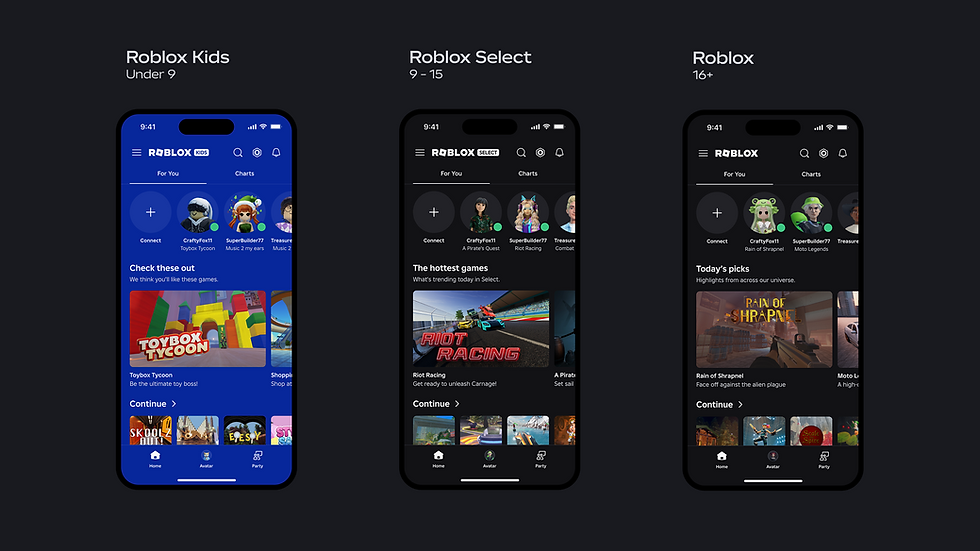
This week, Roblox rolled out Roblox Kids and Roblox Select accounts globally. This update brings age checks, account-level defaults, content ratings, ongoing moderation, and expanded parental controls together into a unified framework for younger users. Let's take a closer look at each new account type and how it may change the way you play on Roblox today.
Roblox Kids (Ages 5-8)
Roblox Kids is the age group all Roblox users will be automatically grouped under if an age check/age verification has not been completed.
Chat
The ability to chat is turned off by default, including game chat and Party chat.
Parents can allow in-game chat within Parental Controls. (Note: All Roblox Kids accounts must have a Parent account linked to them to manage these settings.)
Age checks are still required to access chat.
Games
Can access games rated "Minimal" or "Mild."
Games must pass the standard safety review, as well as complete additional requirements like the maturity questionnaire and number of Highly Engaged Players.
Kids can ask parents to allow them to join more games.
Roblox Select (Ages 9-15)
Roblox Select is the next age group accounts are put in when they turn 9 years old, giving them more relaxed restrictions compared to Roblox Kids.
Chat
The ability to chat is more open, allowing you to communicate with trusted friends.
Access to chat expands once you reach 13 years old.
Age checks are still required to access chat.
Games
Can access games rated "Minimal," or "Mild," or "Moderate."
Games must pass the standard safety review, as well as complete additional requirements like the maturity questionnaire and number of Highly Engaged Players.
Kids and teens can ask parents to allow them to join more games.
Roblox (Ages 16+)
This is the normal version of Roblox that opens up more freedoms after a user turns 16 or signs up at an older age.
Chat
The ability to chat is open.
Age checks are still required to access chat.
Games
Can access games rated "Minimal," or "Mild," or "Moderate." Games rated "Restricted" are locked to 18+.
Games must still pass the standard safety review.

Chatting with Other Users
To chat anywhere on Roblox, you must complete an Age Check or verify with an ID. You can only chat with other users in similar age groups as you. Anytime a Roblox user who hasn't completed one of these methods wants to chat, they will see in-app prompts asking them to complete an age check to chat with others.

Age Groups
Parental consent is required for users younger than 9 to access chat features. Age-checked users 13 and older can connect and chat more freely with people they know beyond their immediate age group if they are Trusted Friends. Age-based chat is designed to prevent children younger than 16 from communicating with adults. By default, users in each age group can chat with users in the groups directly above and below theirs (i.e., users 9-12 can chat with users in their own group, as well as those in the under 9 and 13-15 groups.) Here's a complete guide to what age groups can and can't chat with other age groups:

Chat Summaries
If a user is placed in the same server as other players in different age groups, you won't be able to communicate with each other. However, with Chat Summaries, you can get an idea of the chats occurring by seeing an AI-generated summary. Chat summaries can be turned off via the Roblox in-game Settings menu.

Cross-Server Chat
Users in similar age groups can now chat with each other in the same game, even if they are in different servers using Global chat. Roblox automatically matchmakes these global servers based on language, locale and age, allowing players to chat across servers. There are limits on how many messages can be sent and received to avoid servers from being spammed. If these limits are reached, messages will be dropped automatically.
Game creators can opt-out of the Global Chat tab within the Creator Hub.

Publishing Requirements for Creators
By default, any newly published game will only be accessible to players in the Roblox (16+) age group. To make sure your game can be reached by all players in Roblox Kids and Roblox Select, creators must complete the following requirements:
Complete an age check
Be ID verified
Enable 2-factor authentication on your Roblox account
Have an active Roblox Plus subscription OR pay a refundable 1,000 Robux publishing fee
Have an account in good standing (no violations of Roblox Terms of Use)
Complete an evaluation process for every new game*
If you wish to keep your game limited to 16+ and Trusted Friends, you only need to complete an age check and have a Roblox account that is at least 2 days old. To check if you meet all of these requirements, you can visit the Creator Hub.
*To ensure games are ready for young users, games published by creators who meet the ‘all ages’ requirements will go through an evaluation process. Games will first be trialed with age-checked users above the age of 16. During this process, Roblox tracks signals like account age, play history, and platform spend to verify that engagement is genuine and isn’t derived from fake accounts or bots.
Publishing Fees
In addition to all of the requirements listed above, Roblox creators have the option to pay a one-time, refundable Robux fee per game they want to publish to anyone in Roblox Kids or Roblox Select (<16). The fee, being 1,000 Robux per game, will be refunded 3 months after your game becomes eligible to reach Roblox Kids/Select and as long as it continues to meet Roblox's Community Standards.
If you choose to pay the 1,000 Robux publishing fee and the game is permanently moderated (e.g., due to repeated Community Standards violations) during this three-month window, the fee will not be refunded. If you believe a moderation action was a mistake, you can submit an appeal via the game’s Creator Hub dashboard.
Expedited Review
Eligible creators can also secure an expedited review for Roblox Kids and Select by paying a refundable fee of 100,000 Robux per game. This option is for professional studios that need a predictable launch window to coordinate their Roblox game with off-platform marketing. This review process takes up to 48 hours.
After 90 days, you can request a refund of your deposit. As long as your game remains in good standing and has reached the minimum number of highly engaged players required, you can withdraw your fee and maintain Roblox Kids and Select eligibility. If your game hasn’t hit those organic milestones yet, you can simply choose to leave the fee down to maintain your reach.
Audience Reach
If you own a Roblox game that has fewer than 100 active users in 60 days, anyone under the age of 16 will not be able to play. Creators can regain this ability if their game gains 500 highly engaged players in another 60 days. A "highly engaged" player is a user who has met a minimum purchase amount anywhere on Roblox in the last 60 days. They don’t need to spend anything in your game.

In the coming weeks, Roblox will relax the definition of highly engaged players, which will increase the number of new games eligible for Roblox Kids and Select by an estimated 33% each day.
Links and Resources
Age-Based Roblox Kids and Select Accounts Now Globally Available (Roblox Newsroom)
Roblox Introduces New Age-Based Accounts and Expanded Parental Controls for Users Under 16 (Roblox Newsroom)
What Families Need to Know About Roblox’s New Age-Based Protections (Roblox Newsroom)
Rethinking Chat for Fun, Gameplay, and Civility (Roblox Newsroom)
A New Era of Safety: Facial Age Checks Now Required to Chat on Roblox (Roblox Newsroom)
Alternate Publishing Requirements for Roblox Kids and Select (Roblox DevForum)
Roblox Kids and Select Global Launch: Upcoming Updates to Eligibility, Ads Manager, and Expedited Review (Roblox DevForum)
Publishing Requirements + Roblox Kids & Select Q&A (Roblox DevForum)
Publishing eligibility (Creator Hub)


Bài này viết gọn mà rõ ràng, đọc một mạch là hiểu ngay, cảm ơn bạn đã đăng lên. Mình thì ngày nào cũng hay xem thống kê XSMB để tiện theo dõi, nhưng trước đây phải mở vài chỗ khác nhau nên khá tốn thời gian. Sau đó mình tự tổng hợp lại để xem cho nhanh, kiểu lưu lại trên soicau247.com cho đỡ phải tìm lại mỗi lần cần. Mình chủ yếu quan tâm số liệu cập nhật theo ngày thôi, nên có chỗ gom lại như vậy thấy tiện hơn hẳn. Nếu bạn nào cũng có thói quen xem đều đều thì có thể tham khảo thêm ở đây: https://soicau247.com/quay-thu-xo-so.html.
The roblox is to expensive.